Savage Worlds Dice Probabilities

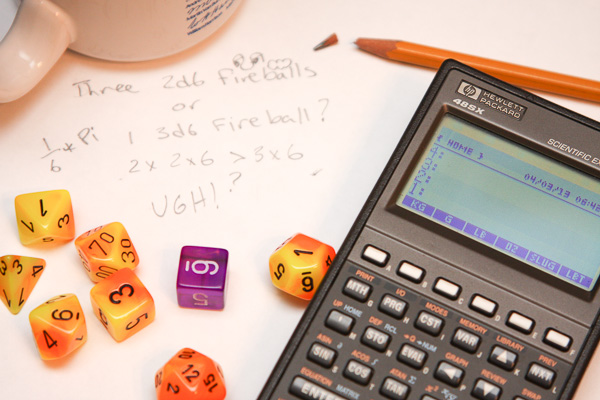
The basic game mechanic of Savage Worlds involves trying to roll a target number or better with a 4, 6, 8, 10, or 12-sided die.

Savage Worlds Dice

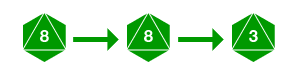
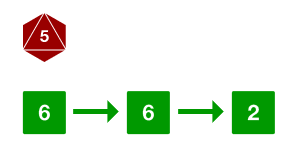
The die can ace if the player rolls the maximum number on it, allowing the player to roll again, adding the result to their original roll. In other games, this mechanic is often referred to as exploding dice or open-ended dice, as the player may continue to roll until they do not roll the max value. For example, if you rolled an 8 on an 8-sided die, you could keep rolling until you did not roll an 8.

Open-Ended d8 Roll

Additionally, player characters and powerful non-player characters are considered wild cards. Wild cards roll an additional wild die, typically a 6-sided die, and the player uses the better of the two rolls. This wild die can also ace. For example, if you rolled another 8-sided die along with a wild die, you might get a higher result on the d6 than the d8.

d8 Roll with Wild Die

As mentioned on other sites, this makes for some interesting probabilities. However, many of these articles either don’t provide a way to calculate the odds of these mechanics, or they provide a more mathematical explanation that might be hard to comprehend if you’ve been out of college for a while like myself.

This article attempts to explain these probabilities in a more accessible way using a close analog to dice, rational numbers in the form of fractions, along with some Python code to aid in calculating probabilities easily.

Exploding Die Probability

The probability of hitting a given number on a die expressed as a rational number is the number of values that will succeed over the number of sides the die has. For example, the probability of hitting an 8 on a d8 is 1/8. Only rolling an 8 is a success. Dividing 1 by 8 and multiplying by 100% gives us a decimal probability of 12.5%. The probability of hitting a 6 or better on a d8 is 3/8, or 37.5%, as rolling a 6, 7, or 8 are all considered successes.

The probability of hitting a 10 on an exploding d8 involves two independent events: first rolling an 8, then rolling a 2 or better. The probability of independent events involves multiplying the probability of the events together.1

\(P(E ∩ F) = P(E) × P(F)\\\)

The chance of rolling the first 8 is 1/8, while the chance of rolling a 2 or better is 7/8 (any value but 1 succeeds). Thus, the chance of rolling a 10 with an exploding d8 is:

\(P = \frac{1}{8}\times\frac{7}{8} = \frac{7}{64} = \textbf{10.9375%}\\\)

Python contains a fractions module that makes coding this trivial.

from fractions import Fraction

def exploding(target, sides):
    exact, remainder = divmod(target, sides)
    exact_roll_prob = Fraction(1, pow(sides, exact)) # 1/n + 1/n + ...
    last_roll_prob = Fraction(sides - (max(remainder, 1) - 1), sides)
    return exact_roll_prob * last_roll_prob

You can compare the results of your calculations using tools such as Troll. Values may not match exactly, however. The code above performs its calculations with rational numbers before converting to floating point values for the final answer. If we were to use floating point numbers for the calculations as well, rounding errors due to floating point math imprecision would introduce small variances in the answer. This is most likely what is happening with Troll.

Wild Die Probability

The probability of hitting a 10 with an exploding d8 and an exploding d6 wild die involves a union of events that are not mutually exclusive. The probability of mutually exclusive events involves adding the probability of the events together. However, we’re not done yet. There is a chance that you’ll hit with both die, and we don’t want to count the probability of hitting the target with both dice when just one of them counts as a success. So to get an accurate probability, we need to add the probability of hitting with either die and subtract the chance of hitting both.

\(P(E ∪ F) = P(E) + P(F) − P(E ∩ F)\\\)

The probability of hitting a 10 with a d8 and a d6 wild die as described earlier is

 \(P(E) = \frac{1}{8}\times\frac{7}{8} = \frac{7}{64} = 10.9375\%\\\)

 \(P(F) = \frac{1}{6}\times\frac{3}{6} = \frac{3}{36} = 8.3333\%\\\)

 \(P(E ∩ F) = \frac{7}{64}\times\frac{3}{36} = \frac{21}{2304} = 0.9114\%\\\)

\(P(E ∪ F) = \frac{7}{64}+\frac{3}{36}-\frac{21}{2304} = \frac{47}{256} = \textbf{18.3593%}\\\)

The Python code to calculate the probability of hitting a target number or better with a given dice and a wild die builds upon the code for exploding die.

def wild(target, sides, wild=6):
    a = exploding(target, sides)
    b = exploding(target, wild)
    return a + b - (a * b)

With the two Python functions, you can accurately calculate the probabilities to hit a range of target numbers with assorted dice.


Resources and References

Statistics in a Nutshell, 2nd Edition

Chapter 2 of O’Reilly’s Statistics in a Nutshell covers probability and was a useful resource in understanding the math from a more practical angle. Specifically useful was the section on calculating the probability of mutually exclusive events starting on page 32.

Python Code and Chart Data

The Python code for this article can be found in a single script in this gist. The data for the charts above was created using the script as is available in this CSV file. The script has been tested with Python 2.7.3 and 3.3.0.

Random Kung Fu Move Name Generator in 5 Lines of Python

I love Python because of things like random.choice, a useful little method that allows you to create mission-critical functionality with very little code. For example, who doesn’t need a random Kung Fu move name at least once a week? I know I do. With Python, its a snap.


>>> from random import choice
>>> a = ['flying', 'thunderous', 'crushing']
>>> b = ['hammer', 'eagle', 'snake', 'dragon', 'lotus']
>>> c = ['fist', 'kick', 'palm', 'strike']
>>> ' '.join([choice(a), choice(b), choice(c)])
'thunderous snake fist'

Improvised Standing Desk

IMG_4920-400x600

Failing Fast with FastMail.fm

So I thought I’d try a non-free email provider for a new domain I’m working on. I’ve used both complimentary email accounts for domains I’ve registered at places like GoDaddy, as well as free accounts at places like Yahoo and Google. I thought it would be interesting, for a change, to use a provider whose primary focus was email.

It was was actually kind of difficult to find anybody still providing email as a their primary business. I suppose it is hard to compete with free. After some research, I settled on FastMail.fm and created an account on August 29th, 2011.

I can summarize my experience to date with three words:

Worst. Service. Ever.

Signing up was easy enough, and a quick test email later confirmed everything was working. I logged onto my web hosting provider and began forwarding email for my new domain to my new FastMail account. I didn’t even have a web site up yet, so I didn’t expect much traffic.

Things went down hill from there.

I came back a few days later to add my account to Outlook, and I noticed several bounced messages in my inbox. Some looked like they’d been sent from my account, but I hadn’t sent them. I also noticed a lot of what looked like spam. I chalked this up to the fact that FastMail has been around a while, and from their blog, it didn’t seem like the strongest spam protection was enabled by default.

The bounced messages were disturbing. I hadn’t sent them, and they were clearly spam, but I’d chosen a strong random password for my account (117 bits, according to KeePass). I’d only ever accessed the account from home, not some unprotected wireless network at the local coffee shop, so I didn’t think my account had been hacked. I deleted the junk messages, configured Outlook, and logged out. I’d check back in a while to see if the spam persisted.

Nine days later, I started Outlook and went to check my messages to see if the amount of spam I was getting had changed. Outlook complained that my username or password for my FastMail account was incorrect. I double checked them, then tried again. No dice. I opened up a browser and tried to log into my FastMail account and was greeted with this message:

The account you are trying to access has been disabled due to over-quota use, or usage abuse. The system limits the number and size of emails you can send in an hour as described here and here. You will have been sent a warning email to your account, and your backup address when you reached half your usage quota, and again when you reached your full limit. These emails will describe the limit you reached, and why your account was disabled.

I scratched my head for a minute trying to think how this might have happened. Had my account filled up with junk because I was routing all email traffic for my new domain to it? I reconfigured email forwarding on my domain to bounce everything but one specific address, then logged into FastMail’s support page and left the following message on September 8th:

I tried to log into my account, and it said I was over-quota and that an email had been sent to my contact address, but I never received it. I haven’t sent out any emails on this account, so I’m confused why I’m getting an over quota problem.

I’ve attached the only email I’ve ever received from fastmail.

I attached my order confirmation email, the only email I’d ever received from FastMail. The next day, I received this unhelpful response from a FastMail admin by the name of Vinodh Khumar:

Hi,

Your FastMail account was recently detected sending bulk/duplicative emails. The Terms of Service that you agreed to on signup prohibits sending of “duplicative messages”.

http://www.fastmail.fm/docs/terms.htm

Section 4

By way of example, and not as a limitation, you agree not to: Use the Service in connection with … any duplicative or unsolicited messages

Consequently your account sending has been locked.

If you can ensure that you would not use your account for further bulk mails, we’ll be happy to unlock your account. If not, we suggest you look for another provider.

There are a number of other providers out there that provide much better ways for sending bulk emails.

I recommend you check out:


*** Newsletter sending services

Helps you send newsletters and other regular correspondence to people on
a mailing list you have. Helps you build the newsletter with templates,
gain analytical insight (eg who reads the newsletter, who clicks on
links in the newsletter, etc), and maintain the mailing list (eg find
dead bouncing addresses, handle unsubscribe requests, etc).

http://www.mailchimp.com/

http://www.campaignmonitor.com/

http://www.aweber.com/

*** SMTP/API/notification sending services

Helps you send emails like notifications or other custom emails. Provide
multiple integration APIs and monitoring services.

http://aws.amazon.com/ses/

http://postmarkapp.com/

http://www.socketlabs.com/

http://sendgrid.com/

———–

They will allow you to manage your subscriptions and email sending much better than Fastmail can. Hope you understand.

FM Webmaster

This was not really the answer I was looking for. I tried to explain that I had not sent these messages.

I understand your terms of service, but I’m confused how my account is sending any emails at all. I only just created it and I don’t think I’ve ever sent anything from this account. I’ve only sent a couple of emails to this account, one directly and one via email forwarding I’ve configured for a new domain.

I did notice lots of bounced mail warnings and other spam when last I logged in, but I thought that was because fastmail.fm had been around awhile and got lots of spam directed to it.

To reiterate, I have *not* been sending bulk email from this account. Perhaps my account was hacked, I don’t know. All I know I that I have not been sending bulk emails from this account.

Can my account be purged and my password reset so that I can regain access to it?

Its been 3 days now. I’m still locked out of my account, and I’ve yet to I receive a reply to the previous message. My money’s gone, and frankly, I’m a little worried they have my credit card on file.

In any event, I guess I’ll be sticking with Gmail.

Update 2011-09-12

After nearly 4 days of waiting for a response to my reply above, my support ticket was unceremoniously closed without comment from Vinodh or anyone else at FastMail. I’ve opened a new ticket. At this point, I just want my money back.

Enforce Strong Django Passwords

We’re using Django 1.3 for a new project at work. One of the things Django provides us with out of the box are convenient password change/reset forms and views. However, they don’t enforce any kind of password strength. As the application touches on financial data, it was suggested we nudge our users towards stronger passwords.

A quick search found django-passwords by Donald Stufft. The source code can be found here.

The django-passwords application provides a PasswordField and validators for enforcing stronger passwords with a number of options. I’ll show you what I did to integrate it with Django’s built-in password change and reset views.

First, install django-passwords with with pip or easy_install. Next, edit your settings.py file and add the application and your preferred password strength settings.

INSTALLED_APPS = (
    'django.contrib.auth',
    'django.contrib.contenttypes',
    'django.contrib.sessions',
    'django.contrib.sites',
    'django.contrib.messages',
    'django.contrib.staticfiles',
    # Uncomment the next line to enable the admin:
    'django.contrib.admin',
    # Uncomment the next line to enable admin documentation:
    # 'django.contrib.admindocs',
    'passwords',
)

# Minimum password strength settings. See the GitHub page for defaults.
# https://github.com/dstufft/django-passwords/
PASSWORD_MIN_LENGTH = 8
PASSWORD_COMPLEXITY = { "UPPER":  1, "LOWER":  1, "DIGITS": 1 }

In the example above, I’ve configured settings.py file to require passwords that are at least 8 characters long and contain at least one uppercase, one lowercase, and one numeric character. Now, any place I use a PasswordField, text entered will be validated against these requirements.

If you wish to use Django’s included password reset/change views, you have one more step do. You’ll need to extend django.contrib.auth.forms.SetPasswordForm and django.contrib.auth.forms.PasswordChangeForm and add the validate_length, complexity, dictionary_words, and common_sequences validators to those forms’ new_password1 CharFields.

EDIT: Matt Austin was kind enough to point out that all your really need to do is override one of the password fields in SetPasswordForm and PasswordChangeForm with PasswordField, so I’ve replaced my convoluted brain-dead implementation with his suggestion below.

from django.contrib.auth.forms import SetPasswordForm, PasswordChangeForm
from django.utils.translation import ugettext_lazy as _
from passwords.fields import PasswordField

class ValidatingSetPasswordForm(SetPasswordForm):
    new_password2 = PasswordField(label=_("New password confirmation"))

class ValidatingPasswordChangeForm(PasswordChangeForm):
    new_password2 = PasswordField(label=_("New password confirmation"))

I put mine in a forms.py file in my application package. Finally, you need to replace the default forms with the new validating versions in the password routes of your urls.py file.

url(r'^password_change/$', 'django.contrib.auth.views.password_change',
    {'password_change_form': TimeStampedPasswordChangeForm}),
url(r'^password_changed/$', 'django.contrib.auth.views.password_change_done'),
url(r'^password_reset/$', 'django.contrib.auth.views.password_reset'),
url(r'^password_reset_done/$', 'django.contrib.auth.views.password_reset_done'),
url(r'^password_reset_complete/$', 'django.contrib.auth.views.password_reset_complete'),
url(r'^password_reset_confirm/(?P<uidb36>[-\w]+)/(?P<token>[-\w]+)/$',
    'django.contrib.auth.views.password_reset_confirm',
    {'set_password_form': TimeStampedSetPasswordForm}),

Congratulations, your site should now be enforcing the heck out of user passwords. However, let’s not get too full of ourselves. XKCD explains why this probably isn’t solving the real problem of password security anyway.

XCKC Password Strength comic